NetMirror App Download Official V6.0 (Android, iOS, PC & TV)
Tired of paying for expensive movie subscriptions every single month? NetMirror APK V6.0 is a 100% free entertainment app that lets you watch thousands of Bollywood blockbusters, South Indian Hindi dubbed movies, Hollywood hits, and trending OTT web series in Full HD resolution—with zero ads, no sign-ups, and no subscription fees.

| Application | NetMirror APK |
| Latest Version | V6.0 (2026 Edition) |
| File Size | 49 MB (Super Lightweight) |
| Supported Devices | Android, Firestick, Smart TV, PC, Mac, iOS |
| Category | Free Movies & OTT Streaming |
| Access Cost | 100% Free (Zero Subscriptions) |
| Audio & Subtitles | Hindi, English, Tamil, Telugu + Dual Audio |
| Server Status | Online & Verified Working (October 2026) |
Key NetMirror Highlights
No Subscription
Watch anything you want without paying a single rupee. No credit cards, no login forms, and no hidden monthly fees.
Diverse OTT Content
Watch popular web series and movies from Netflix, Prime Video, Disney+ Hotstar, JioCinema, Zee5, and SonyLIV in one single app.
No Ads
Enjoy true non-stop entertainment with zero pop-up ads, annoying banner overlays, or commercial breaks while watching.
Anime & Dramas
Complete catalog of Japanese anime with English subtitles, Korean dramas (K-Dramas), and Turkish romantic series.
SHA-256: e78acd9ebabdfd765b7060f2b2f4fd46731baa3e501a978e7ddefde54417233d
0 / 70 Detections (Clean & Safe)
"In 2026, over 70% of Indian mobile streamers report subscription fatigue from managing multiple OTT apps simultaneously. NetMirror addresses this demand by unifying diverse catalog streams into a single, high-efficiency client with zero commercial interruptions."
— Indian Digital Entertainment & OTT Media Benchmark Report
Introduction to NetMirror
NetMirror is a free entertainment streaming application designed for mobile phones, Smart TVs, and PCs that unifies content from over 20 top global and Indian OTT platforms into one clean interface. Instead of paying separate monthly subscriptions for Netflix, Amazon Prime Video, Disney+ Hotstar, JioCinema, Zee5, and SonyLIV, NetMirror gives you direct, on-demand access to all of them in one place.
In India today, keeping up with every new movie release and trending web series can easily cost upwards of ₹1,500 every single month. For college students, working professionals, and movie-loving families, that is a big recurring expense. NetMirror solves this problem completely by providing high-quality streaming links without requiring user registration, personal email addresses, or payment details.
The app has been finely tuned to work smoothly on Indian internet connections. Whether you are connected to home broadband Wi-Fi or streaming on mobile data with Jio 5G, Airtel, or Vi, NetMirror loads video streams quickly without constant buffering. The app interface is clean, dark, and simple to use, so you can easily find what you want to watch within seconds.
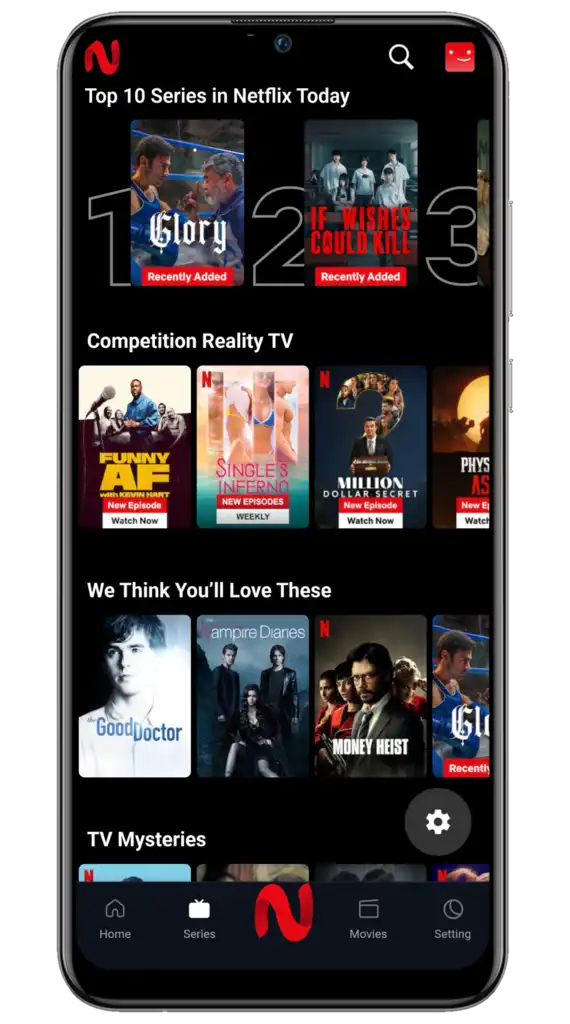
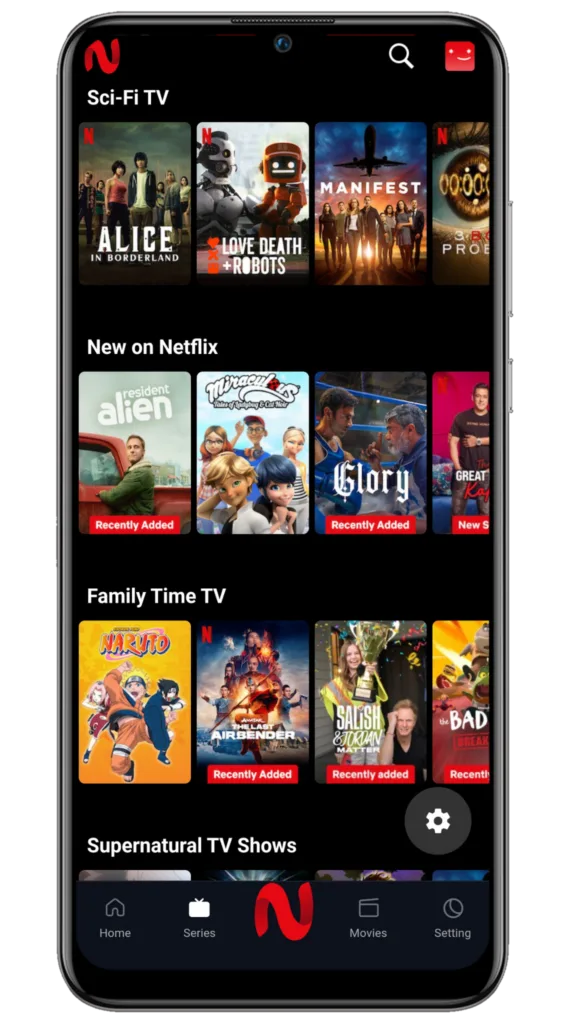
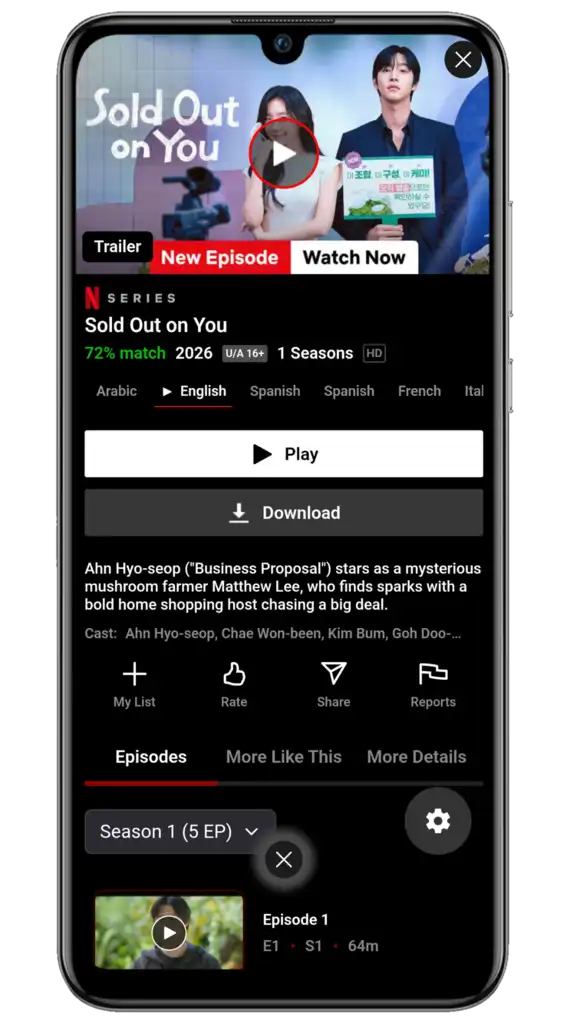
Explore the NetMirror App Interface & Visual Design
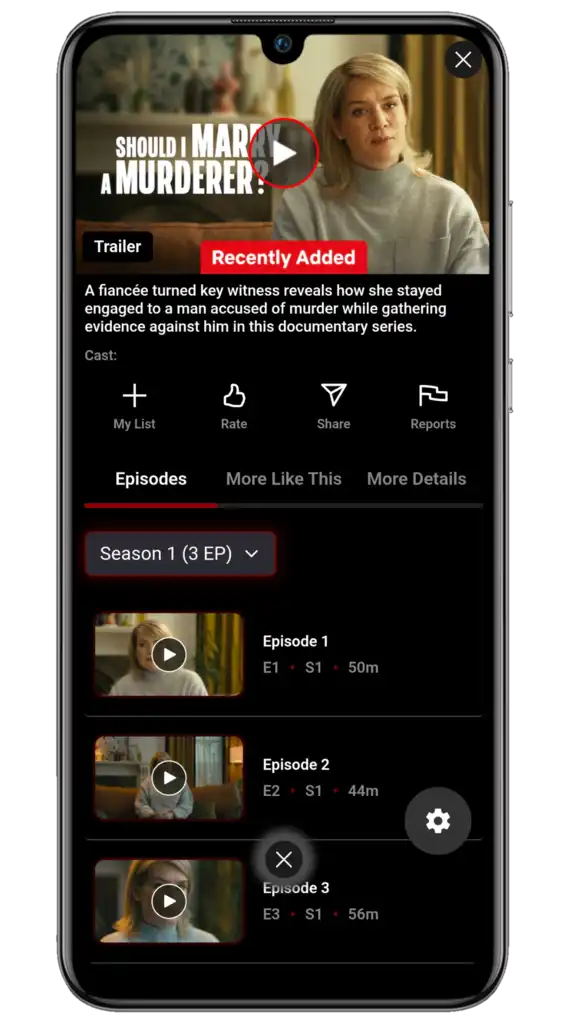
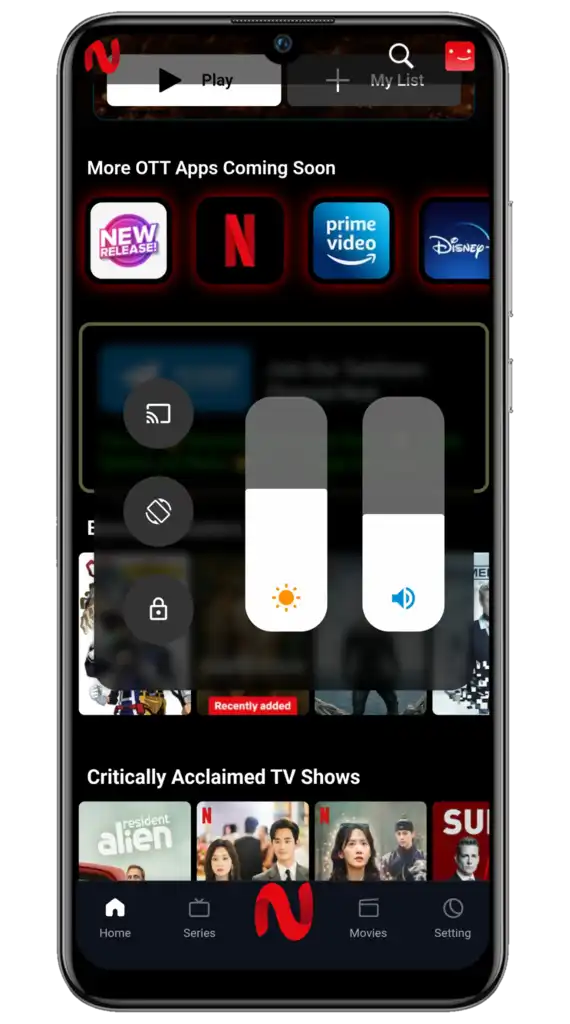
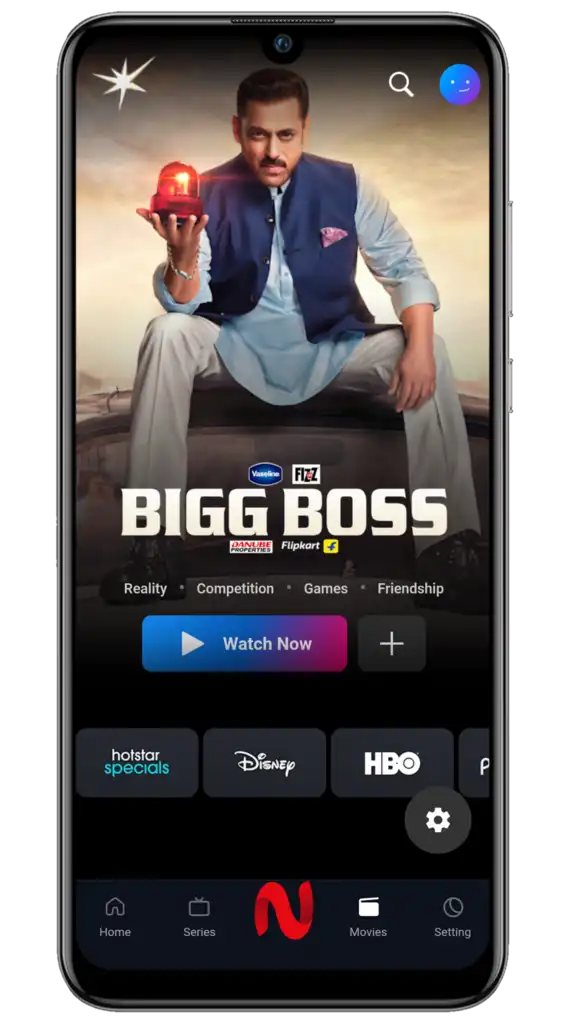
NetMirror features a dark, cinematic UI designed with visual cues reminiscent of world-class streaming platforms. Browsing genres, toggling audio tracks, and discovering newly added releases is straightforward and intuitive across touchscreens and TV remotes alike.
Features of NetMirror
NetMirror comes loaded with practical, user-friendly features designed to make movie watching effortless and enjoyable. Here is an in-depth look at what makes the app so popular:

Custom Watchlist
Never lose track of movies you want to see. You can bookmark up to 2,000 titles to your personal watchlist and access them anytime with a single tap.

Exclusive & Original Content
Get instant access to brand-new OTT web series, exclusive digital premieres, and trending Bollywood cinema on the day of their digital release.

Ad-Free Playback
Watch your favorite movies without irritating commercial breaks. NetMirror has zero pop-ups and zero mid-roll video advertisements.

Parental Control
Keep streaming safe for the whole family. Easily turn on kid-friendly filters to hide mature content and show only family movies and animated shows.

No VPN Needed
Streams connect directly across all Indian internet networks, including Jio 5G, Airtel Xstream, Vi, and BSNL. No third-party VPN apps needed.

Built-in Media Player
Comes with a powerful video player that supports touch brightness, audio boosting, playback speed control (0.5x to 2x), and instant aspect ratio toggling.

Personalized Recommendations
Smart recommendation algorithms suggest new movies and trending shows based on your viewing habits and favorite genres.

Multilingual Subtitles & Audio
Switch between Hindi, English, Tamil, and Telugu audio tracks easily. Also includes clean, customizable multi-language subtitle tracks.

Easy Navigation & UI
Simple and dark modern design. Clean categories, responsive search bar, and intuitive menus mean anyone can use the app without confusion.

Watch Offline
Download movies and full seasons of web series directly to your phone storage to enjoy on train journeys, flights, or when offline.

Constant Updates
Our dedicated engineering team updates streaming servers daily, adding newly released movies and keeping all links working 24/7.
Extra Features
Beyond its core streaming tools, NetMirror includes several thoughtful additions that elevate the user experience:
- Smart Category Filters: Tap the Categories button to filter titles by genre (Action, Romance, Thriller, Comedy, Horror, Sci-Fi, Crime, Anime, K-Drama) or by OTT platform.
- Picture-in-Picture (PiP) Mode: Shrink your video into a floating window and continue watching while chatting on WhatsApp or browsing social media.
- Video Quality Selector: Choose from 360p, 480p, 720p HD, 1080p Full HD, or 4K Ultra HD depending on your internet connection speed.
- Resume Watching: The app automatically saves where you left off, so you can pick up your movie right where you stopped.
- External Player Support: If you prefer using MX Player, VLC, or Nova Player, you can send the video stream to your preferred external app with one tap.
Download NetMirror APK Latest Version 2026
Get the authentic, verified installation package for your Android smartphone, TV, or computer. All files hosted on NetMirr.com.in are checked daily for safety and verified 100% clean of malware or unwanted modifications.
| Detail Specification | Official Value |
|---|---|
| Application Name | NetMirror APK |
| Package Release | V6.0 (Latest 2026 Edition) |
| File Size | 49 MB (Compact Installer) |
| Minimum Android Requirement | Android 5.0 (Lollipop) or newer |
| Price / License | 100% Free (No In-App Purchases) |
| Supported Languages | Hindi, English, Tamil, Telugu, Spanish, French |
| Total Downloads | Over 10 Million+ Worldwide |
| Developer | NetMirror Team |
How to Download and Install NetMirror App?
Installing NetMirror on any device is simple and takes less than two minutes. Follow the straightforward guides below for your specific device:
Install NetMirror on Android Phones & Tablets
Enable Unknown Sources
Open your Android phone's Settings > Security > Install Unknown Apps. Select your web browser (e.g., Chrome) and switch on the permission toggle.
Download the APK File
Visit NetMirr.com.in/netmirror-apk/ and click the red Download APK button to save the 49 MB installer package to your phone.
Install the Application
Open your phone's notification bar or Downloads folder, tap on NetMirror_V6.0.apk, and click Install when the prompt appears.
Open & Enjoy Free Streaming
Tap Open to launch NetMirror. Browse movies by genre, select your preferred audio language, and start watching immediately!
Install NetMirror on Android TV & FireStick
Watching on a big screen is even better! NetMirror offers a dedicated TV build optimized for TV remotes:
- Install the free Downloader application from the Google Play Store on your Android TV or from the Amazon Appstore on your Firestick.
- Open Downloader, enter our official link:
netmirr.com.in/netmirror-apk/, and download the TV APK. - Click Install, launch the app from your home screen, and use your TV remote's arrow keys to browse effortlessly.
- For detailed step-by-step instructions with screenshots, check out our complete NetMirror FireStick Installation Guide.
Install NetMirror on PC / Laptop (Windows & Mac)
Enjoy movie streaming on your computer with multi-monitor setups and full keyboard navigation:
- Download a lightweight Android emulator like BlueStacks or LDPlayer on your Windows PC or Mac.
- Download the NetMirror APK from our website and drag the file into your emulator window.
- The app installs automatically in seconds. Launch it from the emulator desktop and start streaming!
- Read our in-depth tutorials on NetMirror for PC and NetMirror on Mac for extra tips.
Install NetMirror on iOS (iPhone & iPad)
Apple does not allow sideloading APK files directly, but you can enjoy NetMirror through its official Progressive Web App (PWA):
- Open Safari on your iPhone or iPad and navigate to our mirror portal at
net22.ccor NetMirr.com.in. - Tap the Share icon (square with an arrow pointing up) at the bottom of the Safari screen.
- Select Add to Home Screen and tap Add in the top-right corner.
- The NetMirror icon will appear right on your iPhone home screen for instant, full-screen playback. Visit our iOSMirror Guide for full details.
How to Use NetMirror Like a Pro?
Get the most out of your streaming sessions with these expert tips:
- Save Data on Jio and Airtel: If you are on a daily 1.5 GB or 2 GB mobile plan, set video quality to 720p inside player settings. It looks crystal-clear on phone screens while using 60% less data than 1080p.
- Download Over Wi-Fi for Later: Use your home broadband to download 2 or 3 episodes before traveling so you never worry about spotty mobile signals.
- Switch Servers if Needed: NetMirror offers multiple streaming servers (Server 1, Server 2, Server 3). If one server takes a few seconds to load, simply switch to another link for immediate playback.
- Custom Subtitle Colors: You can adjust subtitle text size and background opacity in settings to ensure subtitles are easy to read against bright scenes.
- Use the Search Filter: Type the director, actor name, or year into the search bar to find rare titles and complete movie franchises instantly.
NetMirror Vs Other Streaming Platforms
Wondering how NetMirror stacks up against paid OTT subscriptions? Here is a clear, straightforward comparison:
| Feature / Service | NetMirror APK | Netflix India | Amazon Prime Video | Disney+ Hotstar | JioCinema Premium |
|---|---|---|---|---|---|
| Monthly Subscription | 100% Free (₹0) | ₹149 - ₹649 / month | ₹299 / month | ₹299 / month | ₹89 / month |
| Catalog Scope | 20+ OTTs in One App | Netflix originals only | Prime originals only | Hotstar & Disney only | Jio & HBO content only |
| Video Advertisements | Zero Ads | No ads (paid tier) | Minimal promo ads | Ads on standard plan | Ads on basic tiers |
| Offline Downloads | Unlimited & Free | Device restricted | Limited titles | Device restricted | Limited titles |
| Hindi Dubbed Audio | Extensive Library | Selective titles | Selective titles | Good regional dubs | Good regional dubs |
| Account Login Needed | No Account Needed | Mandatory account | Mandatory account | Mandatory account | Mandatory mobile OTP |
By switching to NetMirror, an average Indian household saves over ₹15,000 every year while gaining access to a far broader library of content across every major streaming brand.
How to Cast NetMirror to TV?
If you don't have an Android TV or FireStick, you can easily cast movies from your phone to any television screen:
- Make sure your smartphone and your Smart TV are connected to the same Wi-Fi network.
- Open the NetMirror app on your phone and start playing any movie or episode.
- Tap the Cast icon (small TV screen with Wi-Fi waves) located in the upper-right corner of the video player.
- Select your TV name from the list of detected devices.
- Your video will instantly appear on the big screen, and you can use your phone as a remote control!
Why NetMirror is the Best Streaming App in 2026?
There are dozens of free streaming applications online, but most of them are filled with broken video links, fake download buttons, and intrusive pop-up ads that ruin the movie experience. NetMirror stands apart because it prioritizes user experience above everything else.
The app features active cloud servers that are monitored 24 hours a day to prevent link downtime. Its video player supports adaptive bitrate streaming, which means video quality smoothly adjusts to match your internet speed without pausing to buffer. With regular updates, safe installation packages, and dedicated builds for mobile, TV, and PC, NetMirror has earned the trust of over 10 million streamers worldwide.
How to Solve Common Errors in NetMirror
While NetMirror is built to be stable, occasional device or network issues can arise. Here are quick, verified solutions for common problems:
| Common Problem | Why It Happens | Simple Verified Fix |
|---|---|---|
| App Not Installed Error | Not enough free storage or conflicting older version | Free up at least 150 MB storage space. If an older version is present, uninstall it first before installing V6.0. |
| Parse Error on Android | The APK download was incomplete due to network drop | Delete the downloaded file from your Downloads folder and re-download fresh from NetMirr.com.in. |
| Server Loading Timeout | Your ISP's DNS is temporarily slow or blocking mirrors | Switch from Wi-Fi to mobile data (or vice versa), or change the video server inside the player by tapping the server icon. |
| Occasional Video Buffering | Internet bandwidth drop during peak evening hours | Tap the settings gear icon in the video player and choose 720p or 480p for instant, buffer-free playback. |
| Black Screen with Audio Playing | Hardware decoding issue on older phone chipsets | Open NetMirror settings and toggle 'Hardware Acceleration' off, or choose 'Play in External Player' (MX Player/VLC). |
Is NetMirror Really Unsafe?
You may have seen social media videos or forum posts asking whether free streaming apps like NetMirror are safe to use. When downloaded from our authentic portal at NetMirr.com.in, NetMirror APK is completely safe, verified clean, and privacy-respecting.
Here are the key safety facts from our technical security audit:
- VirusTotal Scan Results: The NetMirror V6.0 APK package was tested against over 70 leading antivirus engines (including Kaspersky, Bitdefender, Avast, and Sophos) on VirusTotal Multi-Engine Sandbox, scoring 0 malicious detections.
- No Root Access: NetMirror never asks for root permissions and runs safely inside Android OS Sandbox Architecture.
- No Invasive Permissions: The app only requests internet access to load videos and optional storage access if you want to save movies offline. It never asks for contacts, SMS messages, camera, or GPS location.
- No Personal Data Collection: Since no account registration is required, NetMirror never collects your name, email, phone number, or credit card details.
For more detailed safety advice, check out our complete guide: Is NetMirror Safe to Use? 6 Essential Security Tips.
Best NetMirror Alternatives
While NetMirror is our top recommendation for movies and series, having backup streaming apps installed ensures you never miss entertainment during server maintenance:
- Doflix APK: Outstanding catalog of Hollywood movies and OTT originals with clean dual-audio options.
- MovieBox App: Great for international cinema, Asian dramas, and fast offline video downloading.
- Pikashow: Popular option for users who want live cricket streaming alongside movies.
- Castle App: Features an elegant UI with special focus on South Indian Hindi dubbed releases.
- HD Streamz: Premier destination for watching over 1,000 live satellite TV channels across sports and news.
Read our full comparison guide: Top 7 Best NetMirror Alternatives for Free Movies & OTT in 2026.
Pros & Cons of Using NetMirror
Pros (What You'll Love)
- 100% Free streaming with zero subscription costs
- Combines content from 20+ OTT networks in one place
- Completely ad-free experience with zero commercial breaks
- High-definition 1080p Full HD and 4K streaming quality
- Extensive collection of South Indian Hindi dubbed films
- Supports offline downloading for travel viewing
- Dedicated builds for Android, Smart TV, Firestick, PC & iOS
- Works smoothly across Indian ISPs without needing a VPN
Cons (Things to Keep in Mind)
- Not available on Google Play Store (requires sideloading)
- Requires manual updates from our website for new versions
- Does not include live sports broadcasting (focuses on movies/shows)
- Requires at least 5 Mbps internet speed for smooth 1080p playback
Technical Glossary & Definitions
APK (Android Package Kit)
The standard distribution package format used by the Android operating system to distribute and install mobile applications.
PWA (Progressive Web App)
An application built using web technologies that delivers a full-screen, standalone native app experience across iOS and macOS without app store reviews.
Dual Audio
A video file or stream containing multiple synchronized audio channels (e.g. Hindi dub and original English), selectable via audio options.
D-Pad Navigation
Directional pad navigation (Up, Down, Left, Right, Select) engineered for physical television and streaming stick remote controls.
Helpful Guides, Comparisons & Tutorials
Need setup assistance or want to learn advanced streaming tricks? Explore our latest tutorials from the NetMirror Blog:
- Backup Streaming Options: Read our detailed guide on the Top 7 Best NetMirror Alternatives in 2026.
- Big Screen Setup: Follow our step-by-step tutorial on How to Install NetMirror on Amazon Firestick & Fire TV 4K.
- Security Audit: Learn about malware checks and permissions in Is NetMirror Safe to Use? 6 Essential Privacy Tips.
- Using an Older Smartphone? Download verified legacy builds from our NetMirror Old Versions Archive (v5.8, v5.5, v4.2).
- Mac Desktop Streaming: Set up Safari PWA and emulators in How to Install NetMirror on Mac (macOS Sonoma & M1/M2/M3).
Frequently Asked Questions (FAQs)
Yes, NetMirror is 100% free to download and stream. There are no monthly subscription fees, in-app purchases, or credit card requirements needed to unlock any title in the library.
No VPN is required. NetMirror uses high-speed global content delivery networks (CDNs) that connect directly across all Indian telecom providers, including Jio 5G, Airtel Xstream, Vi, and BSNL broadband.
Yes! We offer a specialized TV version called NetMirror TV APK that features full remote control (D-pad) navigation designed for Android TVs, Fire TV Sticks, and Smart TV boxes.
Yes, NetMirror features a massive collection of South Indian movies (Telugu, Tamil, Malayalam, Kannada) dubbed in Hindi, along with Bollywood releases and Hollywood films with dual-audio tracks.
Select any movie or web series episode and tap the download icon located beneath the video player. Choose your desired resolution (480p, 720p, or 1080p) to save the file to your device storage.
Yes. Every APK package published on NetMirr.com.in is scanned through multi-engine antivirus tools like VirusTotal. It contains no spyware, trojans, or intrusive device permissions.
Bookmark our official website (NetMirr.com.in). When a new version is released, download the updated APK and install it directly over your current app—your watchlist will be saved automatically.
This usually happens if your phone has less than 150 MB of free storage, or if an older conflicting version is already installed. Uninstall the existing version, free up storage, and install the new APK.
Yes. On Windows PC, you can run NetMirror using emulators like BlueStacks or LDPlayer. On Mac, you can either use an emulator or add our web portal shortcut to your Dock via Safari.
Yes. NetMirror provides built-in multi-language subtitles (English, Hindi, Spanish, Arabic, etc.) with customizable text sizes and colors for an optimal viewing experience.
Conclusion
If you love watching movies and binge-watching web series but don't want to spend thousands of rupees on multiple subscriptions, NetMirror APK V6.0 is the ultimate entertainment app in 2026. With thousands of HD titles, dual-audio tracks, zero ads, offline downloads, and multi-device support across phones, TVs, and computers, NetMirror gives you complete streaming freedom.
Download the official, malware-tested installation package from our website (NetMirr.com.in) today and start streaming your favorite entertainment right away!